While Excel is a widely used tool for data management, SharePoint lists offer significant advantages in ensuring data integrity and facilitating efficient office workflows. Here are some practical examples highlighting these benefits:
Data Validation: SharePoint lists allow the establishment of validation rules to ensure that entered data meets specific criteria. For instance, when managing vacation requests, you can set a rule that prevents an employee from selecting a start date that is later than the end date, thereby maintaining data consistency.

Mantain Traceability: SharePoint maintains a version history for each list item. If a team member updates a project's status from "In Progress" to "Completed," the system records who made the change and when. This feature enables reverting to previous versions if necessary and provides a clear audit trail of modifications.

Creation of Specific Views: SharePoint lists enable the creation of customized views to display data relevant to the user's needs. For example, in an incident tracking list, you can create a view that shows only incidents assigned to a specific department and pending resolution, helping prioritize tasks effectively.
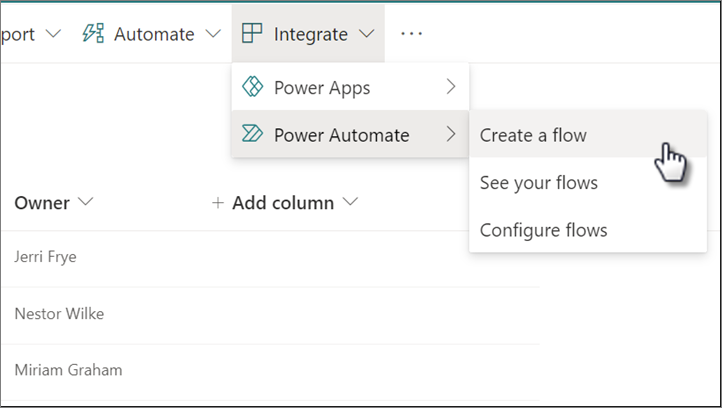
Integration with Power Automate: SharePoint integrates seamlessly with Power Automate to automate processes. For example, when a new item is added to an expense approval list, you can set up a flow that automatically sends an email notification to the appropriate supervisor for review, streamlining the approval process. See more details on how to create your first power automate flow from a list [here]([[Automate things in sharepoint, work less]])
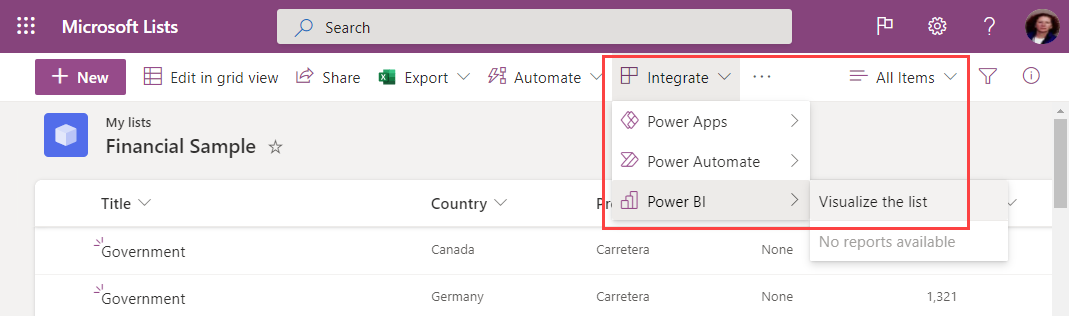
Integration with Power BI: SharePoint lists connect directly with Power BI, allowing the creation of dynamic reports and interactive dashboards. For instance, sales data from a list can be visualized in Power BI to analyze trends, compare performance across different periods, and make informed decisions based on real-time data.
In summary, SharePoint lists provide robust tools to ensure data integrity, facilitate change tracking, customize information display, and automate processes, surpassing the traditional capabilities of Excel in collaborative data management.